FlyGD Wingman

Windows desktop app · Free & open source

FlyGD Wingman

Your OBS recording wingman.

FlyGD Wingman is a free Windows desktop application for people who record gameplay with OBS Studio. It watches your OBS recording folder, lists the recordings it finds, and lets you review them, combine several into one video, and upload the ones you choose to your own YouTube channel.

Why it asks for access to your YouTube account: uploading a video to your channel requires your permission. Wingman requests a single Google permission — youtube.upload — and uses it for exactly one purpose: uploading the recordings you select, at the moment you press upload. It requests nothing else and reads nothing from your account. Full detail on the Google permission →

Everything runs on your own PC. There is no FlyGD account to create and no FlyGD server involved — Wingman talks directly to Google.

Windows 10 and 11, 64-bit. The installer is per-user and needs no administrator rights. Python and FFmpeg are bundled — nothing else to install. Wingman is set to start with Windows by default so it can watch for recordings; you can untick that during installation.

Runs on
Your Windows PC
Google permissions
youtube.upload only
Backend server
None
Licence
MIT — source public
What it does

A short trip from “stop recording” to “here’s the link”

Wingman does one job and tries to do it without ceremony. Everything below is in the shipping application today — there are no coming-soon boxes on this page.

Watches your recording folder

Wingman finds the recording folder from your OBS Studio configuration, or you can point it at one yourself. It waits until a file has finished being written before announcing it, so you never see a half-saved clip.

Lists what you recorded

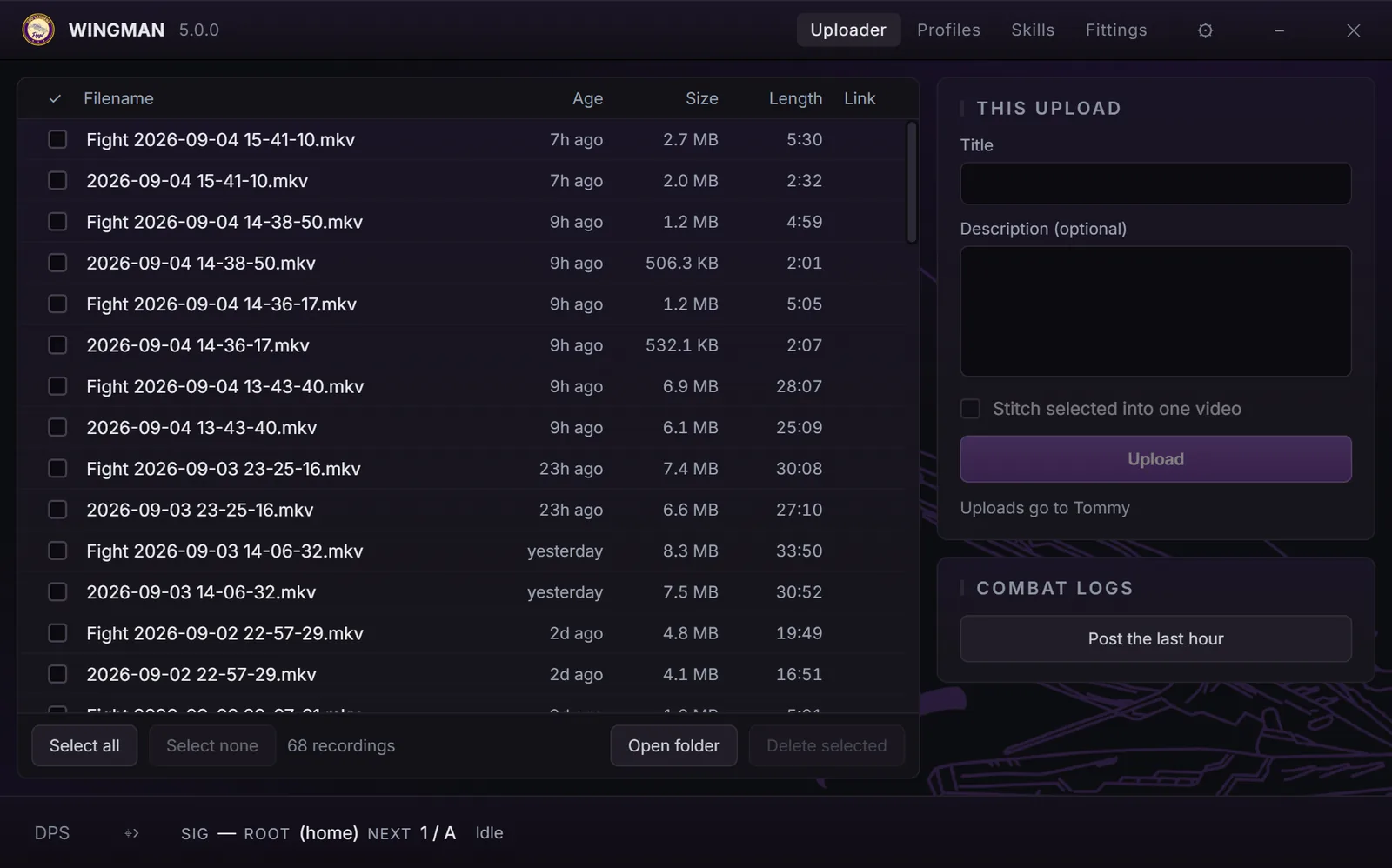
A plain table of your recordings with checkboxes. New ones arrive pre-selected. Nothing is uploaded, moved or changed until you say so.

Stitches clips together

Select several recordings and Wingman joins them into a single video in chronological order, using the FFmpeg build shipped with the app. Your original files are left untouched.

Uploads to your channel

Give a title and description, press upload, and the video goes to the YouTube channel you signed in with. When it finishes you get the video link back in the table, ready to copy.

You choose who can see it

Every upload carries a privacy setting you control — private, unlisted or public. Wingman ships defaulting to unlisted, and you can change it in Settings before you upload.

Bundles EVE combat logs

If you play EVE Online, Wingman can gather the combat logs covering the fight you just recorded and post them to a Discord channel of your choosing. Entirely optional and off until you configure it.

OBS recording workflow

How a session actually goes

Wingman never interrupts a recording and never touches OBS itself. It reads OBS's configuration to learn where recordings land, then stays out of the way.

  1. 01
    Record in OBS as you normally would.

    No plugin, no script to install into OBS, no changes to your scene collection. Wingman is a separate tray application watching the output folder.

  2. 02
    Wingman notices the finished file.

    When the recording stops and the file has finished writing, you get a tray notification. If you would rather the window came to the front instead, that is a setting.

  3. 03
    Open the window and pick your clips.

    Click the tray icon. Recent recordings are listed and the new ones are already ticked. Optionally stitch a selection into one video first.

  4. 04
    Upload the ones you chose.

    Add a title and description, confirm the privacy setting, and upload. Wingman fills in the resulting YouTube link for each row so you can copy or open it.

Deleting is deliberate and permanent. Wingman has a “Delete Selected” button that erases the chosen files from your disk after a confirmation dialog. It does not use the Recycle Bin and it cannot be undone. Nothing else in the app ever deletes or modifies your recordings.

YouTube uploads & Google permissions

Exactly what Wingman asks Google for

Wingman uploads videos on your behalf, so it has to ask for a Google permission. It asks for the narrowest one that exists for the job, and nothing else.

The one scope Wingman requests

https://www.googleapis.com/auth/youtube.upload

That is the complete list. There is no second scope and no profile scope. Wingman calls exactly one YouTube Data API method — videos.insert — and only when you press upload.

Google's consent screen labels this permission “Manage your YouTube videos.” That wording is Google's, and it is broader than what the permission actually grants: youtube.upload permits uploading new videos and nothing else. Editing or deleting existing videos requires a different scope, which Wingman does not request.

What the permission is used for

  • Uploading the video files you selected to the YouTube channel you signed in with
  • Setting the title and description you typed
  • Setting the video category and the privacy status (private, unlisted or public) you chose
  • Returning the resulting video link to you

What the permission does not allow

  • Reading, editing or deleting videos already on your channel
  • Reading your subscriptions, playlists, watch history or comments
  • Reading your channel analytics or your Google profile
  • Touching Gmail, Google Drive, Contacts, Photos or Calendar

These are limits Google enforces on the scope itself, not promises about our code. Separately, and by our own design, Wingman never uploads anything you did not explicitly select.

Where your Google credentials go

You sign in through Google's own consent screen, opened in your normal browser. The resulting access and refresh tokens are written to a file in your Windows user profile and used from there:

Token file
%LOCALAPPDATA%\OBSYouTubeUploader\token.json
Stored as
Plain JSON. Wingman does not encrypt this file — treat it like a saved password.
Sent to FlyGD
Never. There is no FlyGD server, so there is nowhere for it to be sent.
Video data
Uploaded directly from your PC to Google's servers.

Wingman has no backend. Sign-in happens between your browser and Google; uploads happen between the application on your PC and Google's API. No FlyGD-operated service sits in between, receives your tokens, or sees your videos.

One nuance, stated plainly: the Google Cloud project that identifies the application to Google belongs to the project maintainer, and its OAuth client ID and client secret are compiled into the released build. That is how desktop applications are normally distributed and it does not give the maintainer access to your account or your tokens. It does mean the whole user base shares one YouTube API quota — currently 100 uploads per day across everyone using the app.

How to revoke Wingman's access to your Google Account →

Google verification is still in progress. The application is published, so anyone can sign in — but until Google’s review completes, the consent screen shows a “Google hasn’t verified this app” warning. Choose Advanced and continue past it to proceed. The warning disappears once verification clears; nothing else about the sign-in changes.

EVE Online combat logs

Pair a fight recording with its logs

An optional extra for EVE Online players. It is unrelated to YouTube and no Google data is involved anywhere in it.

EVE Online writes a text combat log for each play session. When you select one or more recordings and choose Upload combat logs, Wingman works out the time span those recordings cover, finds the logs overlapping that window (with a few minutes’ margin) in your EVE Gamelogs folder, puts the most recent of them in a single ZIP archive, and posts that archive to a Discord webhook you configured.

  • The Discord webhook is yours — you paste it in Settings, and no webhook means the feature simply does nothing
  • Only your combat logs are sent. Video files are never sent to Discord
  • The message accompanying the archive names the time window, the number of logs and the EVE character names read from them
  • Your original log files are only read — never moved, changed or deleted
  • Nothing from your Google Account or YouTube is involved in this feature at all

Treat a webhook URL like a password. Anyone holding it can post to that Discord channel, and it is stored in plain text in Wingman's settings file. Wingman keeps it out of its own log file, but don't paste it anywhere public.

Local-first by design

There is no service behind this application

Wingman is a desktop tool, not a hosted product. That is not a marketing position — there is genuinely no server to send anything to.

No account, no sign-up

There is no FlyGD account to create. The only sign-in anywhere in the application is Google's — from Settings, or automatically the first time you upload.

No analytics or telemetry

The application contains no analytics, no crash reporting, no usage tracking and no update check. This website has none either — no cookies, no third-party scripts.

Your files stay put

Recordings, settings, logs and tokens all live on your PC. Video data leaves it only when you upload, and then only to Google.

Only two places it ever connects

Google, when you sign in or upload; and Discord, if you configured a webhook and pressed the combat-log button. Nothing else.

Open source

Read the code that handles your credentials

Almost every claim on this page can be checked against the source, which is rather the point of publishing it. The one exception is the OAuth client credential itself: the repository holds a placeholder, and the real value is injected from a protected secret when a release is built.

FlyGD Wingman is released under the MIT Licence and developed in the open. The application is written in Python, packaged for Windows with PyInstaller, and distributed as a per-user installer built by a public GitHub Actions workflow.

The repository is currently named OBS-YouTube-Uploader, from the project's original name; it is the same application, now being renamed to FlyGD Wingman.

Support

Getting in touch

Bug reports, questions about privacy or the Google integration, and feature suggestions all go to the same place — the project's issue tracker:

github.com/elboaf/OBS-YouTube-Uploader/issues

This is a small, unfunded project maintained by volunteers in their own time. There is no support desk and no response-time guarantee, but issues are read.